AI image template: Virtual Haircut for Men: Try 4 Styles on Your Photo
Idoli.ai Template

Virtual Haircut for Men: Try 4 Styles on Your Photo

Compare four men’s haircuts on the same photo before deciding what to ask for at the barber.

Template prompt

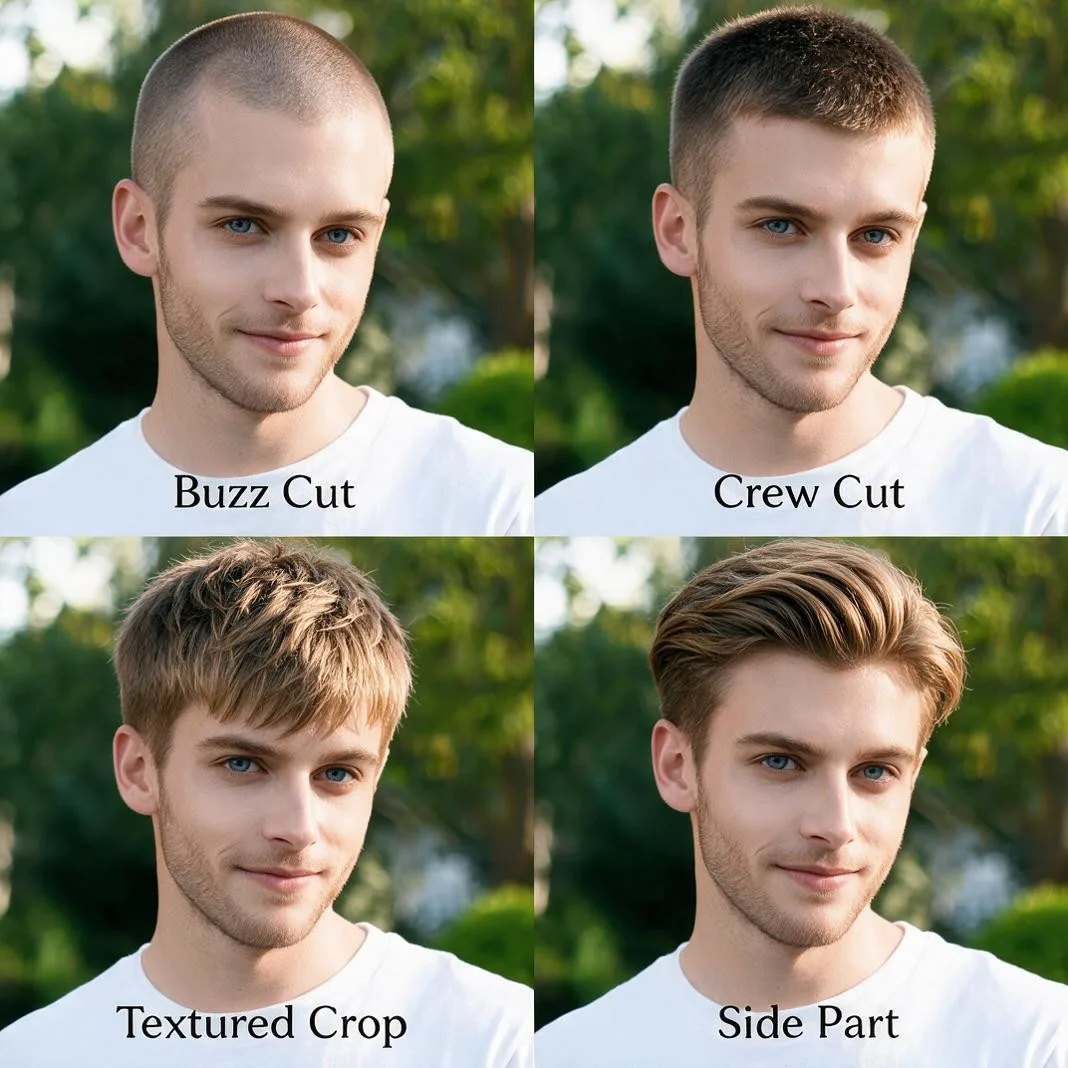
Use the uploaded front-facing photo as the sole reference. Create one 2×2 grid of four equal head-and-shoulders portraits of the same person. Align the eyes at the same height within each tile and leave room above the head so every haircut is fully visible. Match the original facial features, face shape, apparent age, expression, hair color, natural hairline, camera angle, lighting, clothing, and background. Change only the haircut and how the hair is styled. Preserve the original temples and hairline even when the hair is very short or brushed aside. - Top left, **Buzz Cut**. Keep the hair very short and even across the top and sides. Show the original hairline and the contour of the head. - Top right, **Crew Cut**. Keep the sides short and leave visibly more length on top than in the buzz cut, especially near the front. Leave the forehead exposed. - Bottom left, **Textured Crop**. Use a choppy top with a short, forward fringe that partly covers the original hairline. Keep the facial features and forehead shape consistent. - Bottom right, **Side Part**. Give the top enough length to sweep to one side, with a defined part and visible lift. Keep the sides neat and leave much of the forehead visible. Place the matching English label below each portrait. Use the exact four labels above and keep all labels clear of the face and hair. Return one comparison grid.
Pre-configured

📷 image1:1virtual haircut male

About this template

Upload one straight-on, front-facing photo and the template puts four men's haircuts on your own head in a single 2×2 grid. Same ears, same forehead, same hairline you see in the mirror, same light in every tile. The only thing that changes is the hair, which is the one variable worth judging before anyone picks up the clippers. The prompt is built to keep your features, hair color, and natural hairline intact across all four.

The Buzz Cut is the honest one: down to an even stubble, it shows your skull, your ears, and exactly how far the corners have moved. The Crew Cut is the same confession with a safety net — tight sides, a little length kept up front, still zero styling in the morning. The Textured Crop drags a choppy fringe across the hairline, the tile to study if you are quietly negotiating with a widening peak. The Side Part is the only one that costs you upkeep: it needs length, lift, and product, so read it as a daily commitment, not a photo.

In Idoli image generation, add your photo as the reference and run the template prompt. Then read the grid with some doubt. Pull up your original selfie and zoom into the temples, because generative models are flatterers and sometimes hand you a lower, fuller hairline than you walked in with. If the buzz tile rebuilt your jaw or the crop redrew your ears, add an instruction to preserve those details and run it again. Once a cut wins, rerun the same photo as one larger portrait and tune what you would actually tell a barber: how long the top stays, how tight the sides get clipped.

Save the preview to your phone and show it at the start of the appointment, before the cape goes on. Barbers would rather work from a picture than decode "short but not too short." Ask what translates to your hair and get the answer in numbers: a #2 on the sides, this much off the top. The render is front-only, so spend the chair time on the back, the neckline, and how high the sides climb. How to Choose a Men's Haircut Using a Virtual Preview

Similar templates

Photo to Pencil Sketch

Turn a photo into a graphite pencil sketch online. Sign up for 20 credits and create two images at 10 credits each.

Unblur Photos: Sharpen a Soft Portrait

Improve the clarity of a slightly blurry portrait while aiming to preserve the person's features, natural texture, and original photographic atmosphere.

Create Funny Pictures from Photos: Cartoon Caricature

Turn a portrait into a funny cartoon caricature with an oversized head, expressive features, and recognizable details from the original photo.

Full Body Gender Swap AI: A Feminine Fashion Makeover

Reimagine an adult male character as a female counterpart in a head-to-toe fashion portrait, with recognizable facial cues and a coordinated outfit.

AI Ugly Christmas Sweater: Reindeer Party Look

Try a festive sweater with an oversized reindeer motif, raised pom-pom details, and deliberately clashing Christmas patterns on your saved character.