
Every haircut board on the internet has the same problem: the guy in the photo is not you. His jaw is stronger, his hairline is ten years younger, and a professional lit the shot. Hand your barber that screenshot and half of what you are reacting to is not even the haircut. A grid built from your own photo takes the model's face out of the decision: buzz cut, crew cut, textured crop, and side part, all on the skull and hairline you actually live with. Here is how to read the four tiles honestly, and how to turn the one you pick into instructions a barber can cut.
1. Start with a Straight-On Photo
Shoot straight on at eye level, in soft window daylight if you can. Overhead bathroom light throws shadows into the temples that read as recession you may not have. Then:
- Comb everything off your face and push the hair back from both corners. If you are weighing a buzz, the point is to see the hairline you have, not the one you style over.
- Keep your expression neutral and leave room above the crown.
- Get someone else to take it. Arm's-length selfies stretch the forehead.
Add the photo as the reference in Idoli image generation, run the template prompt, and the four previews come back labeled in one grid. Virtual Haircut for Men template
2. Compare Two Cuts at a Time
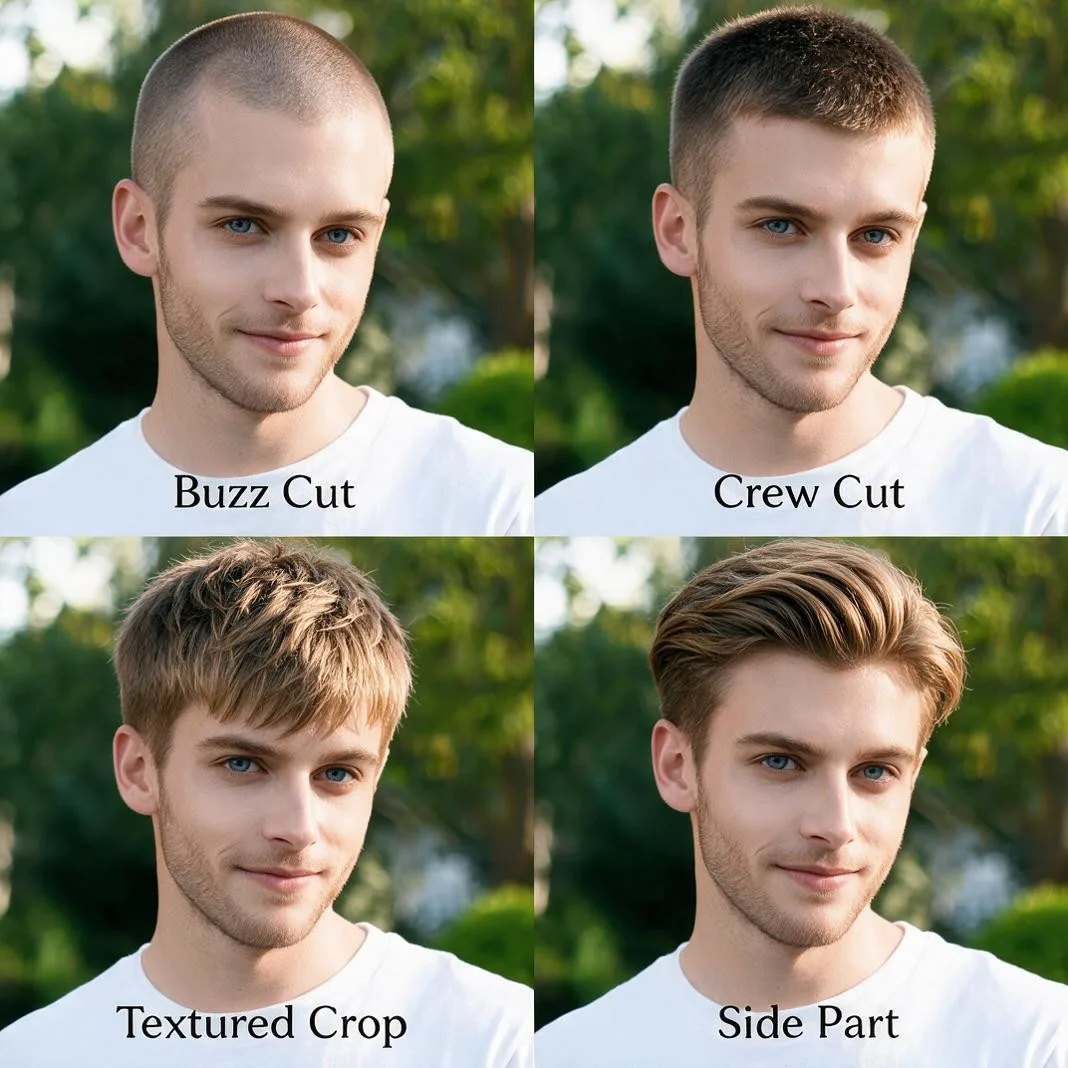
Start with the two short ones. Put the Buzz Cut beside the Crew Cut and look at what short hair cannot hide: your ears, the shape of your crown, how much scalp shows at the corners. The crew keeps some length up front, so the question is simple. Does that extra half-inch of height help you, or does it just look like cover?
Then compare the Textured Crop with the Side Part. Note where the crop's fringe lands. Grazing the eyebrows reads younger, sitting higher reads cleaner, and either way it may be hiding a hairline you would rather not announce. For the side part, check which way it sweeps. Hair parts with the crown whorl, not against it, and a part that fights your cowlick costs you ten minutes every morning. So price that tile honestly:
- Do you own a hair dryer and matte paste?
- Will you actually use them before work?
Last, confirm you are looking at yourself. A flattering model will sometimes hand the buzz tile a lower hairline or thicker temples than your real photo. Hold each tile against the original, check the labels match the cuts, and regenerate anything that quietly redrew your face.
3. Turn Your Favorite into a Barber Reference
Rerun your favorite as a single, larger portrait using the same photo. If you like the crew cut but want less height up front, try this prompt.
Give me a crew cut with short sides and a little less height at the front. Keep my natural hairline, face shape, hair color, and expression from the photo. Show one front-facing portrait.
Then take the phone to the barber before anything gets clipped. Show the picture and ask two questions: what is realistic with your texture, and what guard gets the sides there. Curly and coarse hair springs up shorter than it looks wet. Fine, straight hair will not hold that side-part lift without product. And nobody knows how your cowlick behaves better than the man about to cut around it. The render is front-only, so use the chair time to lock what it cannot show: taper or fade, how high the sides climb, the neckline. Leave the chair with a number, not an adjective.
Frequently asked questions
Which previews show my hairline most clearly?
The buzz cut and crew cut, since both pull the hair clean off the temples. Hold them next to your original selfie, especially the two corners. If the preview came back with a lower, straighter hairline than your photo, that is the AI being generous, not a forecast. Add an instruction to preserve the hairline and regenerate before you trust it.
Can I try a different length for just one cut?
Yes. Rerun the same photo as one portrait and name the change in barber terms. "#2 on the sides, about an inch off the top" lands far more reliably than "a bit shorter."
Can I test a style that is not in the four tiles?
Yes. Use the same photo and ask for a single portrait of the cut by name: a fade, an undercut, a longer fringe. The grid narrows the field. The single portrait settles the details.
The four tiles do not quite look like me. What went wrong?
Usually the photo. Even light, eye level, hair off the temples, and no beauty filter give the model the least room to improvise. Regenerate with an instruction to keep your jawline, ears, and hairline unchanged.
Try Idoli for AI portraits & clips
Lock one idol, generate stills and short videos, publish with confidence.
Try Virtual Haircut for Men Free